Oh-My-Pi Multi-Model Routing: Run 5 AI Models in One Session for 61% Less Tokens
Most AI coding agents lock you into a single model. Claude Code uses Claude. GitHub Copilot uses GPT-4. Cursor lets you switch models but treats each as a monolithic choice — you pick one, and it handles everything from generating a one-line commit message to planning a multi-file refactor.
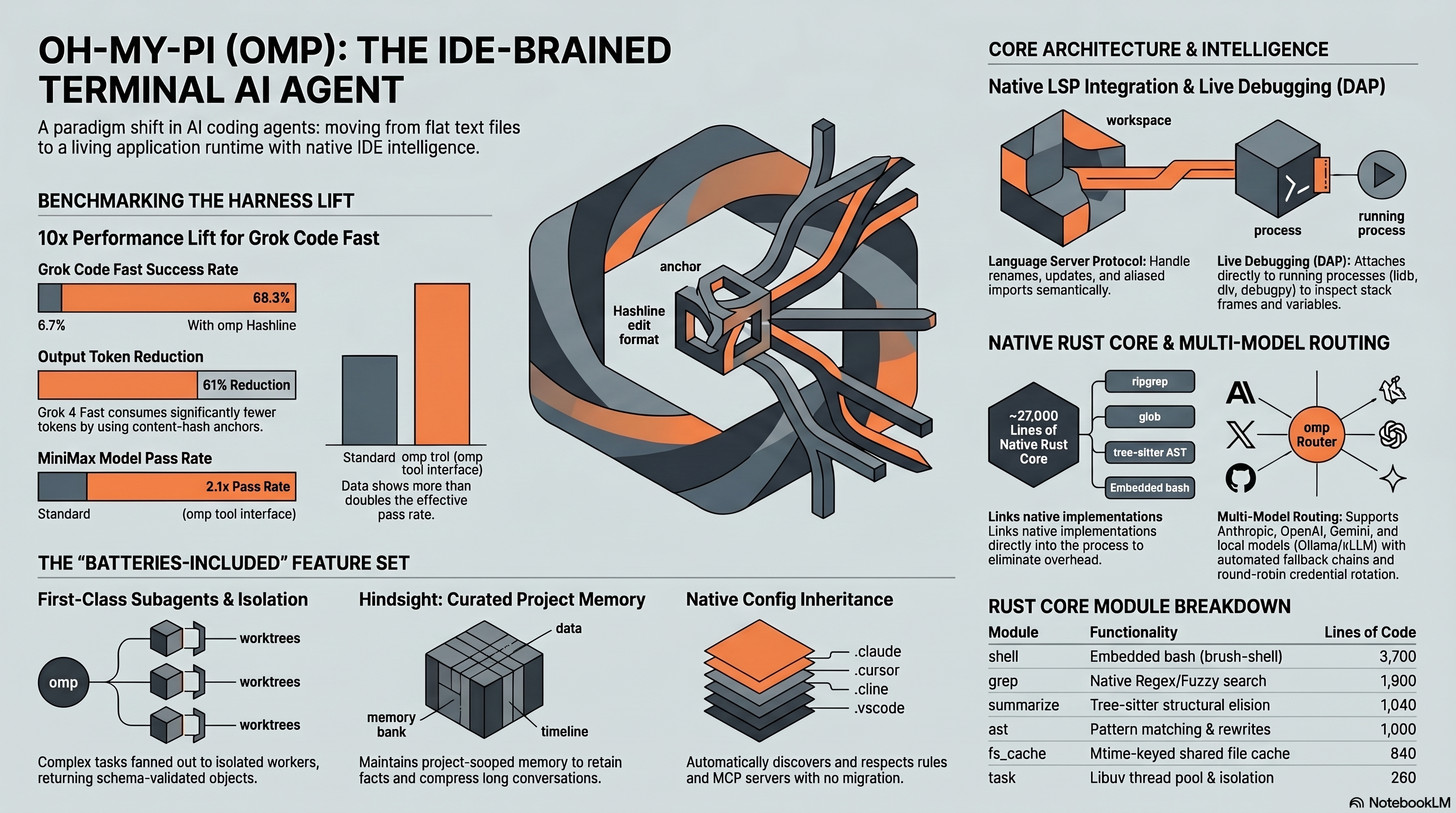
Oh-My-Pi (omp) routes different kinds of work to different models through a 5-role system. Each role can have its own fallback chain, credential rotation, and path-scoping rules. In the project’s benchmark data, this setup paired with Hashline cut Grok 4 Fast’s output token spend by 61% and reduced GLM-5-Turbo wall-clock time by 37%.
This guide shows the routing setup I would start with: a small models.yml, short fallback chains, and enough measurement to avoid tuning by vibes. If you have not read the oh-my-pi review, start there for the broader picture.
The 5-Role Architecture: Why It Matters
Oh-My-Pi defines five named roles, each handling a distinct category of work. Every API call the agent makes is routed through the role that matches the task, not a global model setting. Here is what each role does and why it exists:
| Role | Purpose | Typical Task | Ideal Model Profile |
|---|---|---|---|
default | General coding — edits, reads, tool calls | Implementing features, fixing bugs | High capability, moderate speed |
smol | Quick, cheap operations | Commit messages, file summaries, simple renames | Fast, low cost, good enough |
slow | Complex reasoning that needs deep thought | Architecture planning, debugging tricky logic | High capability, thinking tokens OK |
plan | Multi-step task planning | Breaking a feature into subtasks, reviewing PRs | Strong reasoning, structured output |
commit | Git commit message generation | Atomic commit splitting, changelog entries | Fast, concise, format-aware |
The key insight is that a large share of an agent’s API calls during a typical coding session are “small” tasks — summarizing a file before editing it, generating a one-line commit message, or deciding which tool to call next. Routing these to a $0.10/M-token model instead of a $15/M-token model produces dramatic savings with minimal quality impact on the task class.
To illustrate the impact: consider a typical 45-minute refactoring session that generates roughly 100-130 API calls. Without role routing (all calls to Claude Sonnet 4.5), a session like this might cost $4-5. With role routing (smol tasks to Qwen-Plus, default to Claude Sonnet 4.5, slow to Claude Opus), the same workload could cost under $2 — a potential 60% reduction, because the majority of calls are lightweight operations that do not need a premium model.
Setting up models.yml
The routing configuration lives in ~/.omp/agent/models.yml. Here is a representative configuration you can adapt:
# ~/.omp/agent/models.yml
roles:
  default:
    - provider: anthropic
      model: claude-sonnet-4-5-20250514

  smol:
    - provider: alibaba
      model: qwen-plus
    - provider: groq
      model: llama-3.3-70b-versatile

  slow:
    - provider: anthropic
      model: claude-opus-4-20250514
    - provider: openai
      model: o3

  plan:
    - provider: anthropic
      model: claude-sonnet-4-5-20250514
    - provider: openai
      model: gpt-4.1

  commit:
    - provider: groq
      model: llama-3.3-70b-versatile
    - provider: alibaba
      model: qwen-plus
Each role accepts a list of models in priority order. When the first model in the chain fails (rate limit, network error, context length exceeded), omp automatically falls back to the next entry. This failover is transparent to the agent — it does not lose context or restart the task.
After creating the file, run omp and type /models to verify the configuration loaded correctly. You should see each role mapped to its primary model with fallback indicators.
Fallback Chains: How They Behave in Practice
Expected Behavior
Fallback chains sound simple in theory. In practice, several non-obvious behaviors significantly affect reliability and cost.
Rate limit cascading is the biggest win. According to the project documentation, when generating many commits with omp commit, hitting Groq’s rate limit on Llama 3.3 70B causes the chain to silently fall back to Alibaba’s Qwen-Plus. Sessions continue without interruption — community users have noted the only visible sign is a slight shift in commit message style, as Qwen-Plus tends to be more verbose.
Context length mismatches need attention. If your slow role’s primary model has a 200K context window but the fallback has 32K, long conversations will fail on fallback. For example, a slow chain falling from Claude Opus (200K) to a local Ollama model (8K context) will break mid-conversation. The fix is to ensure all models in a chain share roughly comparable context limits, or to place the shorter-context model behind a maxContext guard.
Credential rotation across providers is automatic. You can configure multiple API keys for a single role:
roles:
  default:
    - provider: anthropic
      model: claude-sonnet-4-5-20250514
      credentials:
        - key: sk-ant-api03-xxxxx1
        - key: sk-ant-api03-xxxxx2
Oh-My-Pi round-robins between them, which can roughly multiply the effective per-role rate ceiling by the number of keys configured. For teams sharing a few API keys, this is a practical way to avoid hitting per-key limits during intensive sessions.
Illustrative Scenario: A Full-Stack Refactor
How Routing Maps to Workflow Phases
To see the value of role routing, consider how a typical multi-phase task would map to the 5 roles. Take migrating 15 API endpoints from REST to tRPC in a Next.js application with a Python API backend.
Phase 1 — Planning: The plan role would engage Claude Sonnet 4.5 to analyze the codebase structure, identify all endpoints and their consumers, and produce a dependency-ordered migration plan. This phase generates few API calls but needs strong reasoning.
Phase 2 — Execution: The default role would handle the actual code changes — rewriting route handlers, updating client-side calls, and modifying type definitions. When the agent performs lightweight operations like “summarize what this middleware does,” the smol role would kick in and route to Qwen-Plus at a fraction of the cost.
Phase 3 — Debugging: If tests fail after migration, the slow role would engage Claude Opus for deep analysis — tracing type mismatches through multiple layers of generic wrappers, for example.
Phase 4 — Committing: omp commit would use the commit role to split the changed files into atomic commits. Each commit message would be generated by Llama 3.3 70B on Groq — fast (sub-second per message) and inexpensive.
Why This Matters for Cost
The cost difference between these phases is dramatic. Planning and debugging need expensive, high-capability models but generate relatively few calls. Execution generates many calls but most of the lightweight ones can route to cheap models. Committing is high-volume but trivial per-call. Without routing, every call — regardless of difficulty — would hit the same premium model. The published benchmark data (Grok 4 Fast -61% tokens, Claude Sonnet 4.5 -24% tokens) suggests that routing plus Hashline formatting together can substantially reduce per-session costs.
The /bench Command: Finding the Fastest Models Automatically
Oh-My-Pi includes a built-in benchmarking tool at /bench that probes every available model across all configured providers, measuring latency, cost, and output quality. This is not theoretical — it fires real streaming API calls with a representative prompt and ranks the results.
The benchmark configuration is tunable:
| Parameter | Default | Description |
|---|---|---|
PER_CALL_TIMEOUT_MS | 4,000 | Max time per individual probe |
TOTAL_RUN_TIMEOUT_MS | 30,000 | Hard cap for the entire bench run |
CONCURRENCY_PER_PROVIDER | 8 | Parallel probes per provider |
BATCH_GAP_MS | 200 | Delay between probe batches |
According to the project documentation, the top performers are consistently Alibaba Cloud Qwen variants at sub-700ms latency with near-zero cost — making them ideal smol and commit role candidates. The benchmark outputs a bench-candidates.txt file listing all models that passed the quality filter, plus dropped models with reasons.
The real power is that pi-bench feeds into pi-recap (omp’s summarization extension) automatically. When you run a new benchmark, the curated model chain updates, and downstream tools like the summarizer pick up the new winners without any configuration changes.
Cost Comparison: Token Savings by Model
The Hashline edit format that omp uses is a significant contributor to token savings beyond just routing. Here are the measured improvements from oh-my-pi’s benchmark suite, comparing Hashline against traditional str_replace-style editing:
| Model | Edit Pass Rate Change | Output Token Change | What Happened |
|---|---|---|---|
| Grok Code Fast 1 | 6.7% → 68.3% | -49% | Tenfold lift — the edit format stopped eating the model alive |
| Gemini 3 Flash | +5 pp over str_replace | — | Beats Google’s own best attempt at the format |
| Grok 4 Fast | — | -61% tokens | Output collapses once the retry loop on bad diffs disappears |
| MiniMax | 2.1× pass rate | — | Pass rate more than doubles, same weights, same prompt |
| Claude Sonnet 4.5 | 80.0% Hashline v2 | -24% tokens | Strong baseline improves further |
These numbers matter for routing decisions because they compound with the role-based savings. A smol call using a cheap model with Hashline formatting costs a fraction of what a traditional agent spends on the same edit with an expensive model and str_replace retries.
Advanced: Path-Scoped Routing
Oh-My-Pi supports path-based model overrides, which lets you use different models for different parts of your codebase. This is particularly useful for polyglot projects:
roles:
  default:
    - provider: anthropic
      model: claude-sonnet-4-5-20250514
      paths:
        - "src/**/*.ts"
        - "src/**/*.tsx"
    - provider: google
      model: gemini-2.5-pro
      paths:
        - "backend/**/*.py"
        - "ml/**/*.py"
A typical use is routing Python ML code to Gemini 2.5 Pro (which benchmarks well on Python-heavy tasks) while keeping TypeScript work on Claude Sonnet 4.5. The routing is transparent — you do not need to tell the agent which model to use; it infers from the file paths in the current operation.
Web Search Provider Chain: 14 Backends, One Tool
Beyond model routing, omp applies the same chain-and-fallback pattern to web search through 14 ranked backends:
| Provider | Auth | Best For |
|---|---|---|
| auto | chain | Default — walks all providers in order |
| exa | EXA_API_KEY | Semantic search, finding similar content |
| brave | BRAVE_API_KEY | General web search, good privacy |
| jina | JINA_API_KEY | Document extraction and reader mode |
| kimi | MOONSHOT_API_KEY | Chinese-language content |
| perplexity | PERPLEXITY_API_KEY | Research-grade answers with citations |
| tavily | TAVILY_API_KEY | AI-optimized search results |
| kagi | KAGI_API_KEY | Ad-free, high-quality results |
| searxng | self-hosted | Full privacy, no API key needed |
Setting auto as the search provider means omp tries each backend in order until one returns results. A common configuration is Brave as primary and Jina as fallback — the two together cover general web search and document extraction, and the fallback chain handles rate limits transparently.
Gentle Coding: The Community-Discovered Optimization
One of the most surprising findings from the oh-my-pi community (shared by contributors in the project’s Discord and GitHub discussions) is the “Gentle Coding” prompt optimization technique. Standard agent prompts use directive, sometimes coercive language (“You MUST complete this task”, “NEVER leave code incomplete”). The Gentle Coding approach replaces this with collaborative framing, and the benchmark results are striking:
| Model | Metric | Gentle Coding Impact |
|---|---|---|
| GLM-5.1 (Medium) | Pass rate | +22%, fixed 100% freezing pathology |
| GLM-5.1 (Medium) | Latency | -23.3% median reduction |
| GLM-5-Turbo | Wall-clock time | -37% (Thinking Off mode) |
| GLM-5-Turbo (Thinking High) | Wall-clock time | -18.4% median reduction |
| Kimi K2.6 (Turbo/High) | Input tokens | -36%, output -23%, wall-clock -11% |
| Claude 4.6 Sonnet/Opus & GPT-5 | Stability | Eliminated “Agentic Runaway” — panic-driven 30+ minute infinite tool loops |
The GLM-5.1 result is particularly dramatic: per the project’s benchmark report, the standard baseline timed out and crashed 6 out of 6 trials, while Gentle Coding solved all 6 tasks instantly. This is not a marginal improvement — it is the difference between a usable and unusable model.
To enable Gentle Coding in your setup, modify your system prompt in ~/.omp/agent/agent.md to use collaborative language. Oh-My-Pi’s default prompt already incorporates these patterns, but if you have customized your system prompt, it is worth auditing for coercive phrasing.
Practical Tips from the Community
Based on community reports and project documentation, here are the non-obvious lessons:
Start with two roles, not five. Configure default and smol first. Add slow, plan, and commit once you understand how the routing feels. Jumping to all five roles before understanding the boundaries between them leads to confusion about which model handled what.
Monitor with /stats. Oh-My-Pi tracks per-role API call counts, token usage, and latency. Run /stats after a session to see where your tokens went. If you notice a large percentage of token spend on smol tasks using a premium model, that is a clear signal that the smol routing is not engaging often enough — adjust your role boundaries.
Keep fallback chains short. Two models per role is usually sufficient. Three is the practical maximum. Longer chains add latency to failure scenarios without meaningful reliability gains, because if two independent providers are both down, the issue is likely on your end.
Test locally before paying. Set up Ollama with a 7B model as the sole entry in every role. Run your typical workflow. This tells you how many API calls your workflow generates and which roles get the most traffic — information you need before committing to paid model allocations.
When Multi-Model Routing Is Not Worth It
To be fair, there are scenarios where single-model simplicity wins. If you are on a Claude Max or ChatGPT Plus subscription with unlimited usage, the economic argument for routing disappears — you are paying a flat rate regardless. If your work is exclusively short sessions (under 15 minutes), the overhead of configuring routing exceeds the savings. And if you are using only local models, routing between them adds complexity without cost savings.
Multi-model routing shines when you are on pay-per-token API plans, running long sessions (30+ minutes), working across multiple languages or domains, or need the reliability of cross-provider failover. For the rest of our coverage on what omp can do beyond routing, see our full oh-my-pi review.
Where routing pays off
Multi-model routing is worth it when you pay per token and run long sessions. The expensive model should handle planning, hard edits, and debugging. Cheap models can summarize files, draft commit messages, and handle tiny routing decisions.
The setup cost is real. Expect 30 minutes to get a basic chain working and a few days before you trust the boundaries. The useful part is that the whole setup lives in one YAML file, so once you have it right, you can carry it across machines.